
The Fastest Way to Pilot a User Testing Application


Pick one high-friction flow, install a user testing application that pairs session replay with funnel mapping, and watch what breaks before you buy anything bigger. That combination gets you from “we think users are dropping off” to “here’s the exact click that loses them” faster than any other setup, because session replay surfaces the client-side bugs and UI states funnel data can’t explain on its own.
For teams evaluating options, LiveSession is the tool worth piloting first. It bundles replay, funnels, heatmaps, and error tracking with GDPR/CCPA controls built in, so you’re not stitching together three vendors just to answer one question.
What you get in the first two weeks:
-
Reproducible bug reports your engineers can actually act on
-
A clear picture of where users abandon your worst-performing funnel step
-
Session recordings your dev team can attach directly to tickets
Start the pilot on LiveSession’s product page and point it at your highest-friction flow first.
Key Takeaways
The fastest way to prove value from a user testing application is piloting session replay and funnel mapping on one high-friction flow for 30 days before expanding.
| Point | Details |
|---|---|
| Pick one flow first | Install on your highest-friction page rather than your entire site to avoid noise. |
| Sequence your diagnosis | Run funnel, then heatmap, then filtered replay, in that order, to find fixable bugs faster. |
| Watch 10 to 15 sessions | Filter replays to your worst funnel step; a small, targeted sample beats random watching. |
| Set a 30-day gate | Expand only after fixing 3+ reproduced bugs or moving conversion by 3% or more. |
| Start with LiveSession | Its combined replay, funnels, heatmaps, and privacy controls fit a fast, low-effort pilot. |
Table of Contents
What a User Testing Application Like LiveSession Gives You
LiveSession works by capturing how real users move through your product, then layering quantitative structure on top of it, so you can quantify what you’re watching instead of guessing.
Here’s the feature set and what each one actually does for you:
-
Session replay → reproduce client-side bugs your QA team can’t recreate manually
-
Heatmaps → spot where users click, scroll, and rage-click across a page at scale
-
Conversion funnels → find the exact step where your signup or checkout flow leaks users
-
Error tracking → catch JavaScript failures and console errors tied to specific sessions
-
Segmentation → filter everything above by device, browser, plan tier, or referral source
-
Custom dashboards → give PMs, designers, and engineers their own view of the same data
On trust signals: LiveSession is built for GDPR and CCPA compliance, with field-level masking for sensitive inputs. It connects to Intercom, Zendesk, Shopify, and Segment, so replay data lands next to your support tickets and product events instead of living in a separate silo. A trial is available if you want to test the setup against your own traffic before committing to a plan.
How Do You Choose the Right User Testing Application?
Most product teams overbuy. They sign a contract for an all-in-one platform, then use maybe a third of it. The better approach: match the tool to your team’s actual maturity and traffic, not to the longest feature list on a comparison page.
Run through this checklist before you sign anything:
-
Feature coverage — Does it cover replay, funnels, heatmaps, and error tracking, or do you need three separate tools stitched together?
-
Implementation effort — Is it a one-line SDK install, or does it need a dedicated engineering sprint?
-
Privacy and compliance — Does it support GDPR/CCPA out of the box, with field masking for PII?
-
Integrations — Does it plug into your existing stack (Intercom, Zendesk, Shopify, Segment) without custom middleware?
-
Support and onboarding — Is there real documentation, or a support team that responds inside a business day?
-
Pricing model — Is it based on sessions, monthly tracked users, or events, and does that model match your traffic pattern?
-
Best-for fit — Is it built for a five-person startup or a 200-person scale-up, and which one are you?
Your traffic and team maturity should narrow the field fast. Early-stage teams pre-product-market-fit usually do better with a focused analytics tool that’s cheap to try and quick to rip out if it doesn’t fit. Post-PMF teams with steady traffic can justify an auto-capture platform with guided workflows, and scale-ups with multiple product lines often need the bundled, all-in-one option because swapping five point tools for one platform saves real engineering time.
Ask vendors directly: What’s the SDK footprint on page load? Are there caps on monthly replay volume? Can you export raw session data? How granular is the masking on form fields? Does it support SSO and role-based access? What exactly do you get in a trial, and for how long?
Pro Tip: Don’t pilot the tool on your homepage. Pick the flow your support team already complains about, whether that’s checkout, onboarding, or a specific settings page, and measure whether the tool gives you a fixable answer within two weeks.
What Do Session Replay, Heatmaps, and Funnels Actually Reveal?
Each feature in a user testing application answers a different question, and mixing them up wastes time.
Heatmaps answer “where, at scale?” They show aggregate click and scroll patterns across hundreds or thousands of sessions, which makes them strong for pages with steady traffic but weak for explaining individual failures.
Session replay answers “why, for this specific user?” It shows you the exact sequence of clicks, rage clicks, and dead ends one person hit, which is where you catch the bug a heatmap can only hint at.
Funnels answer “where in the journey do people leave?” They quantify the drop-off between steps so you know which screen deserves your attention before you start watching anything.
Error tracking answers “which technical failures are actually happening?” It ties JavaScript errors and failed API calls to the sessions where they occurred.
That’s the standard diagnostic order: funnel, then heatmap, then replay, then fix.
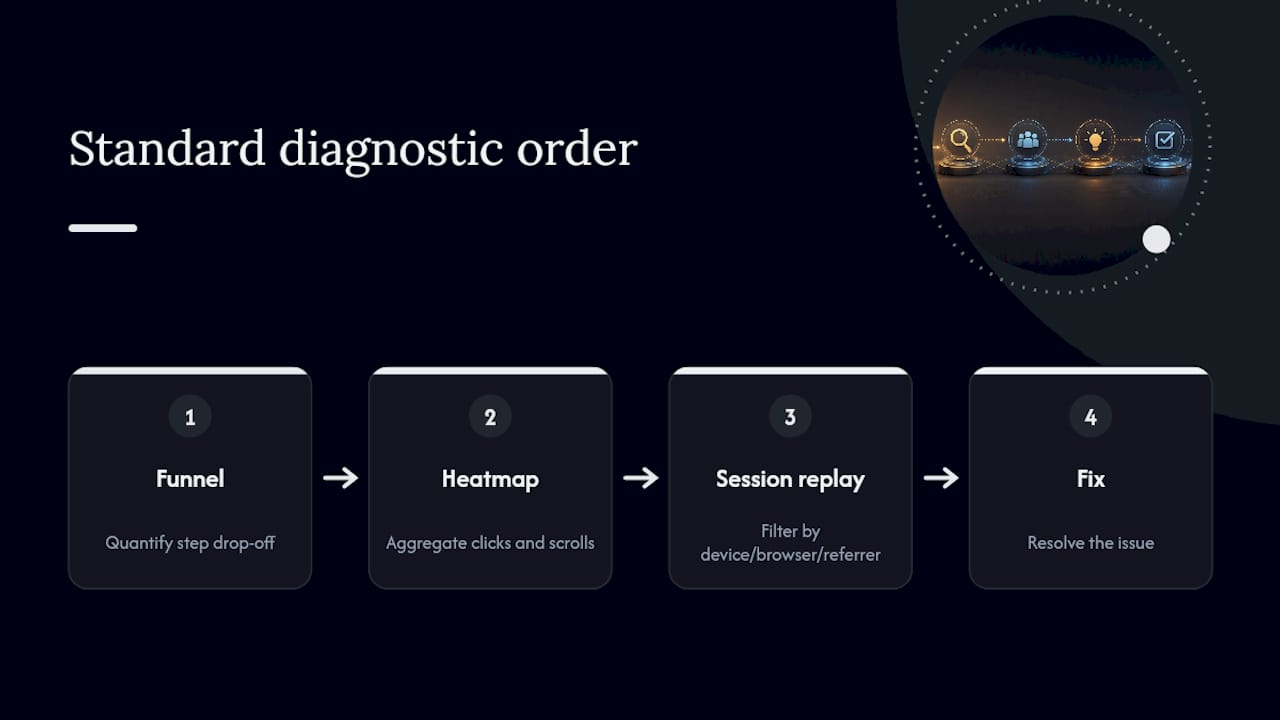
Segmentation sharpens all of this. Filtering replays by device, browser, referrer, or account tier means you’re watching the ten sessions that match your hypothesis, not a random sample of everyone who visited the page today.
Setting Up Your Pilot Without Overengineering It
A good pilot takes days, not a quarter. Here’s the sequence:
-
Install the SDK on two or three pages, or the single highest-friction flow you identified.
-
Set a sampling rate that captures enough volume without recording every visitor by default.
-
Enable field masking on any input collecting sensitive data (payment fields, health info, passwords).
-
Verify your privacy settings match your actual data policy before you go live.
-
Connect Slack or your issue tracker so flagged sessions land where your team already works.
Once it’s running, build a weekly habit: filter replays by your worst funnel step, watch 10 to 15 representative sessions, log what you find, and assign fixes the same day.
Pro Tip: Never open the replay tool without a hypothesis first. Watching random sessions “to see what happens” is how teams burn an afternoon and walk away with nothing actionable.
For developer handoff, capture the replay alongside network logs and console errors in the same ticket. That single artifact often cuts debugging time in half, since your engineer isn’t asking the reporting user to reproduce a bug that only happens under specific conditions.

What Should You Budget For a User Testing Application?
Pricing on these platforms usually hinges on a handful of levers, and vendors don’t always make them obvious upfront.
Watch for these cost drivers:
-
Recording volume caps — how many sessions you can capture per month before overage charges kick in
-
Retention window — how long recordings stay accessible before they’re purged
-
Pricing basis — monthly tracked users, event volume, or flat session counts each scale differently
-
Add-ons — some platforms charge extra for replay specifically, separate from core analytics
-
Deployment model — self-hosted options exist but shift infrastructure cost and maintenance to your team
To compare quotes sensibly, map your expected replay volume against your actual funnel traffic rather than trusting a vendor’s suggested tier. Ask specifically what happens if you exceed your cap mid-month, and request pilot-level pricing before committing annually.
A rough ROI formula: multiply your monthly visitor volume by your expected conversion lift, then multiply that by average order value or annual contract value. Red flags in a quote: vague replay caps, add-ons that appear only after signing, or no clear data export path.

Your 30-Day Pilot: Week by Week
A month is enough time to know if a user testing application earns its place in your stack.
-
Week 1: Install the SDK, verify tracking fires correctly, and confirm privacy settings.
-
Week 2: Turn on heatmaps and funnels on your target flow; identify the worst-performing step.
-
Week 3: Filter replays to that step, watch your sample, log findings, and ship at least one fix.
-
Week 4: Measure the delta on your target funnel and decide whether to expand.
Track these metrics: number of findings logged, bugs reproduced and fixed, conversion change on the target funnel, and average time-to-fix. If you’ve fixed three or more reproduced bugs, or moved conversion by 3% or more, that’s your signal to expand. One sizing note: heatmaps need a sufficient number of visits to show a stable pattern; session replay works at almost any traffic level as long as you filter it tightly.
How Product Teams Actually Run This Week to Week
The rotation works best when one person owns it, usually a PM or UX researcher, not whoever has spare time that week. Engineers should get pulled in only once there’s a confirmed hypothesis worth their attention.
Pro Tip: If you catch yourself watching session after session with nothing to show for it, stop. That’s the “watched twenty sessions, learned nothing” trap, and the fix is always the same: go back to the funnel, find the drop-off, then watch replays filtered to that exact step.
The goal was never to watch more. It’s to ship fewer, better-targeted fixes.
Why LiveSession Fits Your First Pilot
LiveSession gives you replay, funnels, heatmaps, and error tracking in one place, which matters most in a pilot when you don’t want to stitch together three trial accounts just to test one hypothesis. Its privacy controls are built for GDPR and CCPA compliance from the start, and it connects directly to Intercom, Zendesk, Shopify, and Segment, so replay data sits next to the support tickets and product events your team already checks daily.
For developer handoff, exports include network logs and console errors alongside the replay itself, which is the detail that actually speeds up bug fixes. Before you start a trial, have your highest-friction flow identified and your privacy policy ready to match against masking settings. Then head to the LiveSession pilot page and get your first sessions recording this week.
Frequently Asked Questions
What is a user testing application used for? A user testing application, sometimes called product analytics or a user feedback solution, captures how real users behave in your product through session replay, heatmaps, funnels, and error tracking, so product teams can find and fix friction without relying on surveys alone.
How is app user testing different from usability testing in a lab? Application usability testing observed through session replay happens passively, at scale, on real users doing real tasks. Lab-based usability testing is moderated and small-sample, useful for early concept validation but not for catching intermittent bugs or funnel-wide drop-offs.
Do I need developer resources to install a user testing application? Most platforms, including LiveSession, use a lightweight SDK that a developer can install in under an hour. The heavier lift is deciding sampling rate, masking rules, and which flows to prioritize, not the install itself.
How long should a pilot run before deciding to expand? Thirty days is usually enough. That gives you time to install, gather a meaningful sample on your target flow, and ship at least one fix based on what you find in filtered replays.
What privacy features should I check before enabling session replay? Confirm GDPR and CCPA compliance, field-level masking on sensitive inputs like payment and password fields, and a clear data retention policy before recording any real user sessions.
Sources
Related articles



Get Started for Free
Join thousands of product people, building products with a sleek combination of qualitative and quantitative data.